Showing posts with label Mail. Show all posts

Temporary or disposable free email services are those which provide you give you a temporary email ID and inbox which is totally spam free and needs no registration or sign up. This is very much useful if you want to get some content from forums where registration is a needed. You can use the temporary email ID to register. Most of the temporary email IDs have very less expire time. So here is a list of top 31 temporary and disposable email service.

1. GuerillaMail provides you with a temporary inbox for a period of 15 minutes.

2. TemporaryInbox is yet another simple and easy to use temporary email service that gives you an email address in different formats

3. Mailinator is one of the top rated disposable email services that gives you a temporary mailbox.

4. MyTrashMail is another pretty good temporary mail service

5. SpamGourmet is yet another service which provides you with a temporary email addresses.

6. Mint Email – provides with a temporary disposable email address with a validity of four hours and also has automatic email verification

7. YOPMail – YOPMail is a different kind of disposable email service, where you can create email addresses without even visiting the site, simply use username@yopmail.com. Only thing to note is that the username should be unique as anyone can see the mails received to the particular username.

8. NowMyMail – NowMyMail is another service which will allow you to create temporary disposable email addresses.

9. MailExpire is a disposable email service with a longer expire time ranging from 12 hours expiry to as long as 3 months.

10. MailEater gives you a free temporary email inbox in the format username@MailEater.com

11. Jetable allows you to set the expire time of your temporary inbox and also allows you to forward the emails in the temporary inbox to the permanent address. They even have Firefox addon

12. SpamBox gives you a temporary email address in the format e.g. username@spambox.us and also allows users to set the expire period of your inbox

13. DontReg is another temporary email service which is faster and safer

14. TempEmail aims to give you a fast, anonymous yet secure temporary email inbox

15. PookMail is a email inbox service that gives an email address in the format e.g. username@pookmail.com

16. SpamFree24 is another free temporary email service provider

17. Skeefmail lets you pick a temporary address. You can also choose a random address instead of picking one yourselves.

18. SpamHole provides you a temporary email which has a validity of 2 hour.

19. 10MinuteMail generates a temporary email for 10 minutes

20. TempoMail is another temporary email inbox services that give you spam-free mailbox

21. KasMail provides with temporary email ID which requires registration and allows up to 25 aliases.

22. MailCatch - MailCatch is another disposable email service that allows you to create temporary disposable mailboxes.

23. SpamMotel is another service which requires registration and provides mail forwarding, mail can be accessed through desktop e-mail clients,

24. GreenSloth is another service which does not requires any registration, but it is a receive-only e-mail and expires automatically after a week

25. AnonInbox requires no registration and is easy and simple to use.

26. Spam.la is a disposable email service which requires no registration

27. TempEmail is another free temporary and disposable email service provider

28. EmailZorz lets you make an address like username@emailzorz.com. There are also a some variations to the domain like you can use emailrama.com, emailzorz.com, e-mailzorz.com and mailzorz.com

29. Email Bugmenot Another good disposable email service where emails are auto deleted after 24 hours.

30. Lite drop Provides a disposable e-mail addresses which is set to expire after 60 Minutes.

31. MeltMail is another service which provides with the option to select the expire time. You can chose from 3h, 6h, 12h and 24h.

There are many more services which provides temporary and disposible email IDs. If your favorite ones are not written, do share it here with the features.

This might be a feature which many of Indian users are waiting for. As many people cannot afford for GPRS & many people even don’t know about how to use GPRS. Mobee.in forwards all your emails via SMS to your phone. This service doesn’t requires any GPRS connection which can be used on any mobile phone which supports SMS.

Login was bit time consuming for me, as they sent mobile verification code & password to mobile via SMS. One should have been enough to verify mobile phone, either they could have sent password or verification code. After sign up, it took me 3-4 mins to find out how to change password! I actually went to “My Account” to change password, but it was provided at “Dashboard”.


After sign up it creates an email ID something like yourmobleno@mobee.in. This email ID should be added in “Forwarding Options” of actual email service. Like in gmail, goto “Settings–>Forwarding & POP” & forward your mails to mobee.in email ID. Now mails sent at gmail comes to your mobile via SMS. Mobee.in has filtering options & black list using which you can receive only emails which are important via SMS.

Mobee.in isn’t a completely service, infact it cannot be continued using for free. Upon sign up user gets 20 credits, means can receive 20 emails via SMS. Free account also has limitation of only 10 emails per day. You have to buy more credits to continue using this service. If you get too many emails & an active user of internet, this might not workout. GPRS might come cheap. This service will be useful if you want to track important emails like Job Offerings, Interview replies…etc using filters.

Shift+Del is easy to delete but hard to recover, Is this you have in your mind? Nope, Now there are options to recover deleted mails from outlook.

"Tools -> Recover Deleted Items" is enabled by default in Outlook 2003. Also you should be using Microsoft Exchange Server e-mail account in order to use this facility. Follow below steps for Outlook 2003.

1. Go to Run by clicking on Start and type in regedit.
2. Now go to HKEY_LOCAL_MACHINE, expand Software.
3. You will find Microsoft there. Expand Microsoft.
4. Expand exchange and then client.
5. You will find Options there. Right click on Options, choose New and click on D Word Value.
6. Now right click the new Dword Value and rename it to DumpsterAlwaysOn. Note: This is case sensitive.
7. Right click on the DumpsterAlwaysOn and modify the Value data to 1 and click on OK. When you type 1, this means the Recovery deleted Item is on. Also 0 to turn it off.
8. Now open Outlook and click on Tools.
9. Choose 'Recovery Deleted Items'

HitMeLater is an excellent idea which makes email Snoozing not only possible but easy. Just forward any e-mail to 12@hitmelater.com and you will receive the e-mail you sent 12 hrs later. Similarly you can send it to 6@hitmelater or 8@hitmelater to snooz e-mail by 6 or 8 hours.


E-mail snoozing is also possible based on the day of the week. For example, monday@hitmelater.com or friday@hitmelater.com, etc..

It promises to be secure and spamfree and the best part - no registration required!
It would be great if this service could be used to alert, remind or wish others, however, it sends the e-mail back to the ID it received from and none other.
Well, we can always create a from with a custom e-mail address field to send e-mail to HitMeLater.com

FutureMe.org is another e-mail scheduling option available for use.

Tags: E-mail Snoozing, HitMeLater, Schedule E-mails

MAIL HEADERS. You will not normally see full headers when you read your mail but these can be important in investigating Internet fraud. Use below instructions to see mail header...

Microsoft Outlook Express for Windows: Right click on the message and select Properties. Choose the Details tab and select the Message Source Button.

Microsoft Outlook: Click the View menu and select Options. You should see a pop up window "Message options" or similar. Notice the box called Internet headers near the bottom of the window. This box contains the full headers.

Windows Live mail:
1. Select the message that you want to view the header information.
2. Click the right button of your mouse and select "Properties".
3. Click on the "Details" tab.
4. Click "Message Source..." .
5. A new windows will open with the header information of the e-mail.

Gmail: It took me a little while to work it out, one needs to click the "down arrow" next to the "Reply" indicator at the top-right of the message pane and select "Show Original", a new window page opens with all the header details.

Netscape Messenger 4.7 - 6: Open the email; go to the view menu; pull the 'Headers' menu over and click on 'all'.

Netscape Messenger 6.2 and higher: Go to Netscape Messenger Inbox. Select View - Headers - All.

Pegasus: Users of the excellent Pegasus for Windows will probably not need me to remind them of the Raw View tab and the option to include headers in the Reply and Forward dialogues.

Incredimail: In your mail program double click the email you would like to view, when it is open click on the FILE menu and choose PROPERTIES. When in the properties menu click on the DETAILS tab to view the Full Headers .

WEB MAIL HEADERS
Yahoo web mail: First you must turn on "Full Headers". From your Yahoo! mail account, click on "Mail Preference". Scroll down the page to "Message Headers" and click on the "all" radio button. Save your preferences at the bottom of the page.

Hotmail: First, configure your options: On the upper right "Options | Help" links, click on "Options." Click on the "Mail Display Settings" link, find the item "Message Headers." Choose "Advanced" and click the "OK" button.


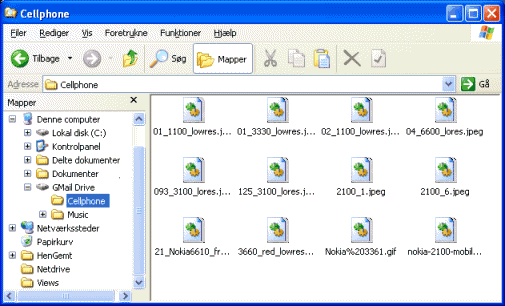
“GMail Drive is a Shell Namespace Extension that creates a virtual filesystem around your Google GMail account, allowing you to use GMail as a storage medium.
GMail Drive creates a virtual filesystem on top of your Google GMail account and enables you to save and retrieve files stored on your GMail account directly from inside Windows Explorer. GMail Drive literally adds a new drive to your computer under the My Computer folder, where you can create new folders, copy and drag’n'drop files to.
Ever since Google started to offer users a GMail e-mail account, which includes storage space of a 1000 megabytes, you have had plenty of storage space but not a lot to fill it up with. With GMail Drive you can easily copy files to your GMail account and retrieve them again.When you create a new file using GMail Drive, it generates an e-mail and posts it to your account. The e-mail appears in your normal Inbox folder, and the file is attached as an e-mail attachment. GMail Drive periodically checks your mail account (using the GMail search function) to see if new files have arrived and to rebuild the directory structures. But basically GMail Drive acts as any other hard-drive installed on your computer.You can copy files to and from the GMail Drive folder simply by using drag’n'drop like you’re used to with the normal Explorer folders.
Because the GMail files will clutter up your Inbox folder, you may wish to create a filter in GMail to automatically move the files (prefixed with the GMAILFS letters in the subject) to your archived mail folder.”

Here's how someone who had malicious intent could set you up with a Gmail account and then later hack into your new mailbox and contact list: First, they need a secondary account that isn't a Gmail address.

A Yahoo or Hotmail address would work fine. Now, when they generate an invitation for you, they type in your first and last name, but their email address.

The invitation is sent to them and they forward it along to you, cut and paste it into a friendly response to your request ("Try this link for an account:") or even just redirect the message so it appears to have come directly from Gmail. But what's different now is that the secondary email address is theirs, not your non-Gmail account:


You sign up, fill in the fields indicated on the Gmail signup form, leave that without thinking because "heck, it's probably just a referral" or similar, and then use your Gmail account without thinking about it again.

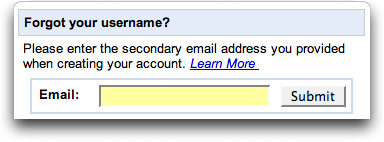
Some time later, when the hacker figures you've used the account enough that you'll have a good address book, lots of mail in your archive, etc. they go to the Gmail signup page and click on "I forgot my password":


They select to have a new password generated and sent to the secondary mail address - which is their email address, not yours - and you're now locked out of your account while they can pretend to be you as much as they'd like.

It's a bit convoluted, but if you are signing up for a Gmail account, make double sure that where it says "Secondary mail" that you have your own address, not someone elses address.

Note that you can also change this once you're logged in to your Gmail account by going to your Google Account Information and clicking on Security Question and Contact Info.

After few issues related to Gmail security that exposed Gmail users to hijack attempts, Google has been consistently taking necessary measures to beef up and tighten the GMail security. Recently, Google has introduced SSL (secure socket layer) feature or secured connection in Gmail.

Sample slides of how it is hacked (courtesy of gnucitizen.org)


How to be safe?


This is extremely important especially when you are using internet connection on public area such as airport (WiFi). By enabling this feature, it will effectively encrypt data being sent to and from Gmail, keeping your data safe from being retrieved by unrelated parties. You can enable this feature by clicking on the “settings” tab and scroll down to the bottom where you can see the following option.


Why such connection is not set to be secured by default I hear you ask. One of the reason why Google giving Gmail users an option to choose from is due to the trade off that need to be experienced by users. When secured connection is put in motion the connection will be a little bit sluggish because of the encryption and decryption process.